Crypto Mining
Cyber thieves are now after your computer's processor power. They exploit the computers of innocent users to conduct their operations. Cryptojacking attacks can be carried out without even installing malicious software on your computer, simply through a web page. The new trend is cryptojacking. They use your computer's processor power to mine cryptocurrency, and they do so without you even noticing. Previously, they used to infiltrate other people's computers and install malicious software, but now they don't need that anymore. Exploiting web browser vulnerabilities is all it takes. Whether their batteries are draining prematurely or their fans are running non-stop, thieves can easily continue their work.
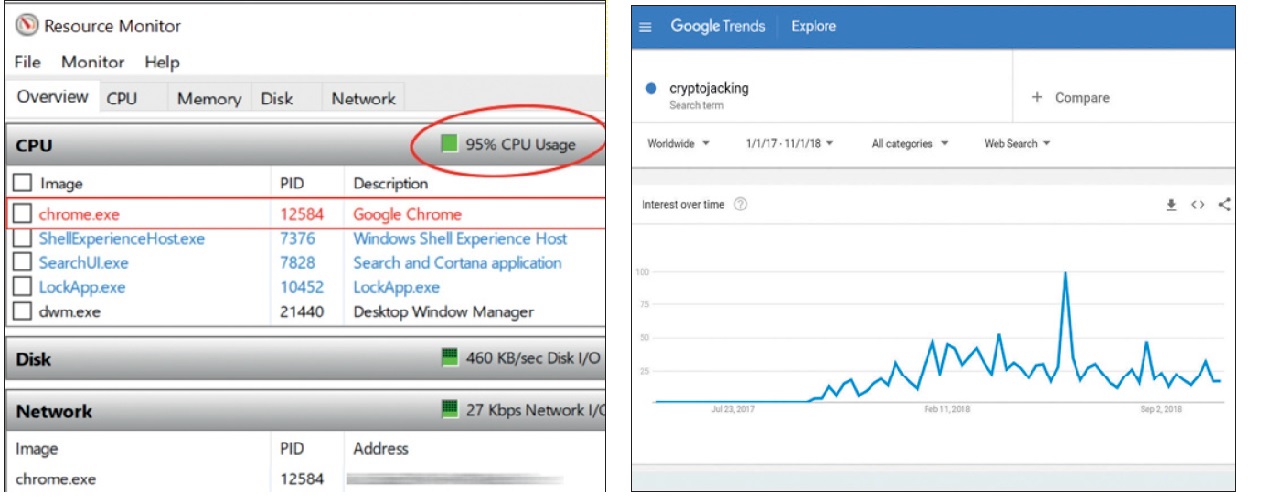
Using every last drop: Through the Google Chrome browser. It suddenly appeared out of nowhere: A recently unknown attack has suddenly become a conflagration.
The term "cryptojacking" has suddenly become a rage.
Check yourself!
If you experience these symptoms, your computer may be a victim of cryptojacking:
>If the system freezes briefly after opening a browser window.
>If the battery drains very quickly and takes very long to charge. Rapid battery drain indicates that the system is under heavy load. If you don't regularly perform heavy tasks on your computer, it's worth checking.
>A fan that won't shut down, a slow and sluggish system response, frequent crashes, and similar abnormal behaviors may also indicate that you are a victim of cryptojacking.
The most effective measures to combat cryptojacking:
>Be vigilant. Anti-advertising plugins like NoCoin and MinerBlock can stop web-based cryptojacking attacks. Completely blocking JavaScript execution in the browser minimizes the risk.
>Only install well-known, widely used, and secure browser extensions.
>Don't forget to install important security updates. Hackers' favorite thing is to find current vulnerabilities and infiltrate them.
>Use smart browsers. Browsers Opera Mini, Opera for Android, and Opera for the desktop directly block cryptomining.
What is an algorithm?
> An algorithm is a step-by-step method for solving a problem. Each step is solved using a detailed, predetermined set of instructions. Algorithms are generally used in data processing, calculation, searching, and sorting. For example, an algorithm is used to calculate an employee's salary. Algorithms are used even in non-technical tasks. For example, a recipe or a manual explaining how to unpack and install a disassembled library are actually algorithms.
> In more complex systems, algorithms work through a concept called "deep learning." A subcategory of machine learning, this concept involves algorithms that mimic the human brain's thinking and attempt to extract meaningful solutions from vast data pools. The learning style that people call "experience" also applies to algorithms. With each iteration, the algorithmic method is slightly modified and improved based on the data learned from the previous iteration. This is why this method is called "deep learning," because every acquired knowledge is written into a layer. This method is used in a wide range of applications, from autonomous vehicles to facial recognition, from disease diagnosis to automatic translation programs.
Quote: Chip Magazine, Issue: 2019/2, ISSN: 1300-9419